How to Turn Photographs into a Memory Gallery Installation
Plan a photo-led installation that organizes memories, works in the venue and creates a meaningful visual destination.
View the original inspiration post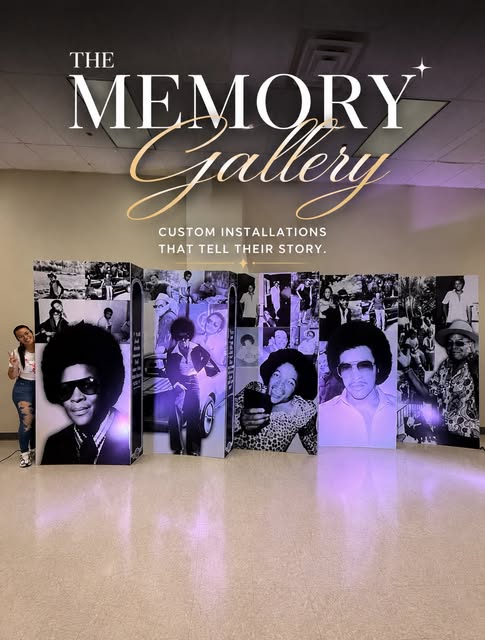
Inspired by our “The Memory Gallery” post, this guide explains how photographs can become a spatial installation rather than a simple collage. The image shows multiple tall panels with black-and-white photographs arranged in a gentle curve and accented by purple uplighting.
This format can support celebrations, planner-designed experiences and business events that need to present people, milestones or a visual story. The useful production lesson is to plan the photographs, panel sequence, lighting, floor space and viewing path as one composition.
Decide what story the gallery should tell
A chronological tribute, family history, founder story and event milestone need different sequences. Start by defining the beginning, middle and final impression. This helps determine how many photographs deserve prominence and which supporting images can appear at a smaller scale.
Design for people standing in front
Place essential information outside the area most likely to be covered by heads and bodies. Keep the main title high enough to remain visible, but not so close to the trim that it feels cramped. For group photographs, allow calmer areas near faces and avoid putting critical words across the center line where people will stand.
Create one visual system
Choose consistent crop rules, image treatments, margins and panel relationships. Black-and-white photographs can unify images from different periods, while controlled color can separate chapters. For business use, approved organizational marks and type should support the story without overpowering the people in the photographs.
Check the real environment
- Measure usable wall and floor space, ceiling height and nearby doors or exit signs.
- Identify front light, overhead spots and colored event lighting that can change contrast.
- Reserve enough camera distance for full-width and group photographs.
- Keep walking, service and accessibility paths clear around the display.
- Plan how edges, panel joins or supports will interact with the artwork.
Review the file at production scale
Use high-resolution photographs and vector logos when available. Check safe margins, spelling, crop and small text. A detail that looks strong on a laptop may disappear when viewed from across a ballroom, while an image that looks sharp on a phone may reveal artifacts when enlarged. The final material and panel structure should be considered during layout review.
Request the exact configuration
Browse the backdrop products, open the relevant item, choose the closest size and material, and upload the available artwork. Add the configuration to the quote cart and submit the event details. Magic Prints For You confirms the scope through email and sends the Square payment link after the exact quote is approved.
A memory gallery succeeds when image selection, sequence, scale and venue planning work together. The result gives guests a natural place to pause, connect and understand the story.